

- Home
- >
- Ride Metro
- >
- Accessibility Guide
Accessible Travel on Metro
Metro is committed to making bus and rail service accessible for all riders, including customers with disabilities. All Metro buses and trains include accessibility features designed to support safe and independent travel.
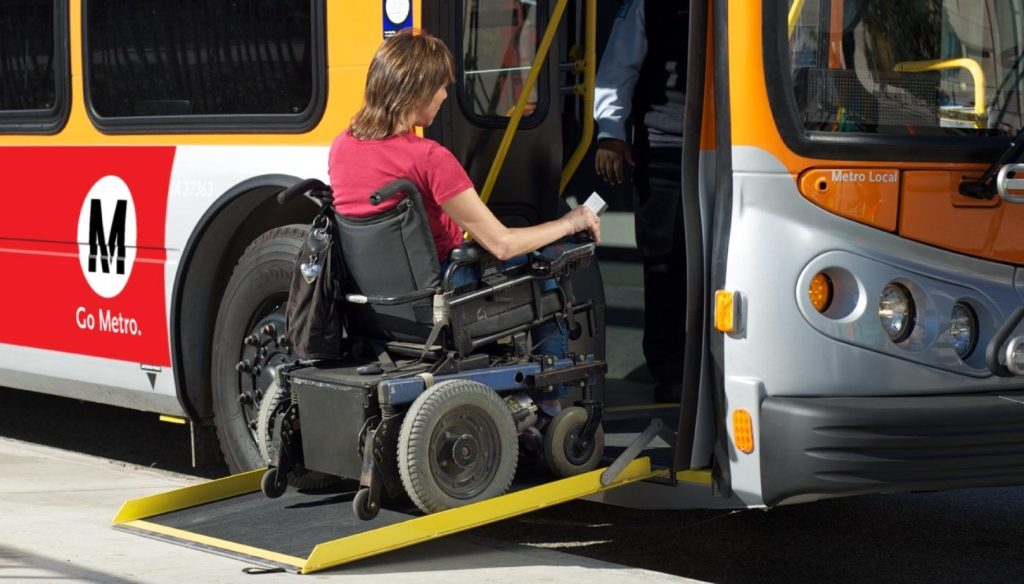
Riders Using Wheelchairs
All Metro buses and rail lines are wheelchair accessible.
- Every rail station has a ramp, walkway or elevator to the platform.
- If an elevator is out of service, you may take a bus to the next station at no cost.
On the Bus
- The wheelchair securement area is 30″ x 48″. Two wheelchairs are allowed on the bus at a time.
- Bus operators will assist with boarding, positioning and securement.
- Most mobility devices, including scooters and power chairs, can be accommodated if they fit safely on the ramp and within the securement area.
On the Train
- There are no securement devices on rail cars.
- Set brakes or turn off power while riding.
- Use designated areas marked with the wheelchair symbol.
Riders Using Mobility Devices
Mobility aids include walkers, canes, crutches, and similar devices.
- Fold aids when possible, and keep devices clear of aisles and doors.
- Walkers cannot be used as seats while riding.
- Operators can assist with seating.
Riders with Vision Impairment
Metro provides multiple accessibility features, including:
- Automated stop announcements on buses and trains.
- Braille and tactile station signage, and directional signage near stairs and escalators.
- Yellow platform gap warning poles and textured platform edges for safety.
Riders with Service Animals
Service animals are welcome on board Metro buses and trains. While they do not require certification, they must:
- Be under control at all times.
- Perform a task related to a disability.
Pets and emotional support animals must be in enclosed carriers.
Station Navigation
Many rail station entrances have turnstiles for validating TAP cards. Please use the entrance designed for persons with disabilities, located on the left and marked with the wheelchair symbol. If you’re unable to tap your card at the turnstile, please use the hands-free intercom.
To use the hands-free intercom:
- Approach the intercom near the turnstiles; a red light will come on when the hands-free sensor detects you.
- An attendant’s voice will come through the speaker and an amber light will turn on.
- Speak to attendant to confirm you require assistance or wait for the next light.
- When a green light turns on, proceed to the wheelchair-accessible gate and the attendant will remotely open it for you.
Resources
Service alerts (including elevator outages)
